pico-ducky
Make a cheap but powerful USB Rubber Ducky with a Raspberry Pi Pico
## Install
Install and have your USB Rubber Ducky working in less than 5 minutes.
1. Download [CircuitPython for the Raspberry Pi Pico](https://circuitpython.org/board/raspberry_pi_pico/). *Updated to 7.0.0
2. Plug the device into a USB port. It will show up as a removable media device named `RPI-RP2`.
3. Copy the downloaded `.uf2` file to the root of the Pico (`RPI-RP2`). The device will reboot and after a second or so, it will reconnect as `CIRCUITPY`.
4. Download `adafruit-circuitpython-bundle-7.x-mpy-YYYYMMDD.zip` [here](https://github.com/adafruit/Adafruit_CircuitPython_Bundle/releases/latest) and extract it outside the device.
5. Navigate to `lib` in the recently extracted folder and copy `adafruit_hid` to the `lib` folder in your Raspberry Pi Pico.
6. Click [here](https://raw.githubusercontent.com/dbisu/pico-ducky/main/duckyinpython.py), press CTRL + S and save the file as `code.py` in the root of the Raspberry Pi Pico, overwriting the previous file.
7. Find a script [here](https://github.com/hak5darren/USB-Rubber-Ducky/wiki/Payloads) or [create your own one using Ducky Script](https://github.com/hak5darren/USB-Rubber-Ducky/wiki/Duckyscript) and save it as `payload.dd` in the Pico.
8. Be careful, if your device isn't in [setup mode](#setup-mode), the device will reboot and after half a second, the script will run.
### Setup mode
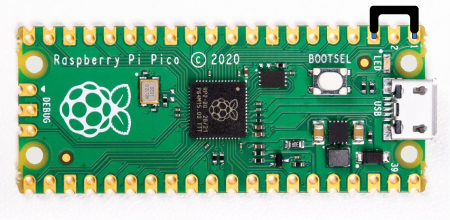
To edit the payload, enter setup mode by connecting the pin 1 (`GP0`) to pin 3 (`GND`), this will stop the pico-ducky from injecting the payload in your own machine.
The easiest way to so is by using a jumper wire between those pins as seen bellow.
## Useful links and resources
### Docs
[CircuitPython](https://circuitpython.readthedocs.io/en/6.3.x/README.html)
[CircuitPython HID](https://learn.adafruit.com/circuitpython-essentials/circuitpython-hid-keyboard-and-mouse)
[Ducky Script](https://github.com/hak5darren/USB-Rubber-Ducky/wiki/Duckyscript)
### Video tutorials
[pico-ducky tutorial by **NetworkChuck**](https://www.youtube.com/watch?v=e_f9p-_JWZw)
[USB Rubber Ducky playlist by **Hak5**](https://www.youtube.com/playlist?list=PLW5y1tjAOzI0YaJslcjcI4zKI366tMBYk)
[CircuitPython tutorial on the Raspberry Pi Pico by **DroneBot Workshop**](https://www.youtube.com/watch?v=07vG-_CcDG0)